A Practical Guide to Smart Home Monitoring for Garages
Garages are one of the highest-risk, lowest-attention areas of most homes. Doors get left open. Temperatures swing harder than inside the house. Water finds its way in under thresholds. Wi-Fi drops at the exact corner you’d want a signal from.
A good garage monitoring setup is not surveillance. It’s a small set of clear signals that reduce “quiet failures” — the kind you don’t notice until they’ve become expensive, inconvenient, or unsafe. This guide focuses on decision-making and placement so you can build coverage that feels calm and low-friction.
Why garage monitoring is different
Garages sit in a strange zone: they connect to the home, but they behave more like an exterior space. That means they have a different risk profile than living rooms or bedrooms.
- Access risk: the main garage door is a large opening, and the interior access door is often overlooked.
- Environmental risk: freezing temperatures, high heat, humidity, and exhaust can affect stored items and equipment.
- Infrastructure risk: garages often have the weakest Wi-Fi and the most inconsistent power behavior.
The most effective setups keep alerts quiet and high-signal: door status, entry events, and a small number of threshold alerts.
What to monitor in garages (and what to skip)
Monitor: garage door status (open/closed) as a primary signal
The single most useful garage monitoring signal is “is the door open?” It’s clear, actionable, and avoids the noise of motion alerts. If you want product options, start with our garage sensor roundup, which covers practical tools for door status and garage-specific alerts.
Monitor: the interior access door
In many homes, the garage-to-house door gets used constantly and can be left ajar. A simple entry sensor here can be higher signal than a camera. If you want a broader comparison, our entry sensor guide breaks down what actually matters.
Monitor: temperature extremes where they create risk
You don’t need to track garage temperature all day. You do want alerts for thresholds that matter: freezing risk (pipes, stored liquids, paint), extreme heat (batteries, certain tools), or sustained abnormal swings that indicate the space isn’t behaving as expected.
Monitor: power loss and restoration if the garage has critical equipment
If your garage supports freezers, chargers, heaters, pumps, or Wi-Fi gear, power awareness becomes important. It also matters because outages can knock your monitoring offline. For a practical approach, reference our guide to power outage monitoring.
Usually skip: constant motion notifications
Garages are noisy by nature: cars, delivery activity, family movement, and light changes. Motion alerts tend to be high volume and low value unless you have a specific need. For most homes, door status plus a few threshold alerts is enough.
Use selectively: cameras for context, not primary detection
A garage camera can be useful for verifying a delivery, checking a door, or seeing whether something is obstructing the sensors. But cameras are rarely the best first-line prevention tool. If you’re comparing camera options, see our camera guide.
Common mistakes
Starting with cameras and hoping they “catch everything”
Cameras provide context, but they don’t create clean signals. If you want low-friction monitoring, start with door status and entry sensors, then add a camera only if you genuinely need visibility.
Ignoring Wi-Fi dead zones
Many garages have weak coverage due to distance, concrete, metal doors, and HVAC equipment. If your sensor drops offline, it stops being monitoring. Solve coverage early, or simplify the plan until you have reliable signal.
Using too many alerts
The fastest way to mute your system is to over-notify. In a garage, alerts should be rare: open too long, opened at unusual hours, access door left ajar, temperature beyond threshold.
Placing sensors where it’s convenient instead of where risk is highest
Garages have clear failure points: the main door, the interior door, threshold water intrusion zones, and areas where cold air pools. Placement should follow those realities, not the easiest place to stick a device.
What to know before setup
Build an alert hierarchy for garage events
- Immediate push alerts: garage door opened during away hours, interior access door opened (if you want this), temperature beyond critical threshold.
- Delayed alerts: garage door left open for a set duration (often more useful than instant alerts).
- Logs only: routine open/close events during normal household hours.
Decide what “normal” looks like in your household
A garage that’s used constantly (school runs, sports gear, packages) needs different settings than a garage that’s rarely used. The goal is to be notified only when behavior is unusual or risky.
Be realistic about temperature sensors
Temperature readings vary across a garage. Cold pools near the floor and along exterior walls; heat can build near the ceiling. If you care about freeze risk, placement low and near the vulnerable area matters more than perfect accuracy.
Plan for battery life and durability
Garages are tougher environments than interior rooms. Cold temperatures can shorten battery life. Choose fewer devices, check them monthly, and replace batteries early rather than waiting for failures.
Placement: a practical garage checklist
Main garage door
- Door status sensor: place to reliably capture open/closed state.
- Consider a “left open” duration alert: this is often the highest value garage notification.
Garage-to-house access door
- Entry sensor: high signal, low noise when configured well.
- Optional alert: door left ajar can be more useful than every open/close event.
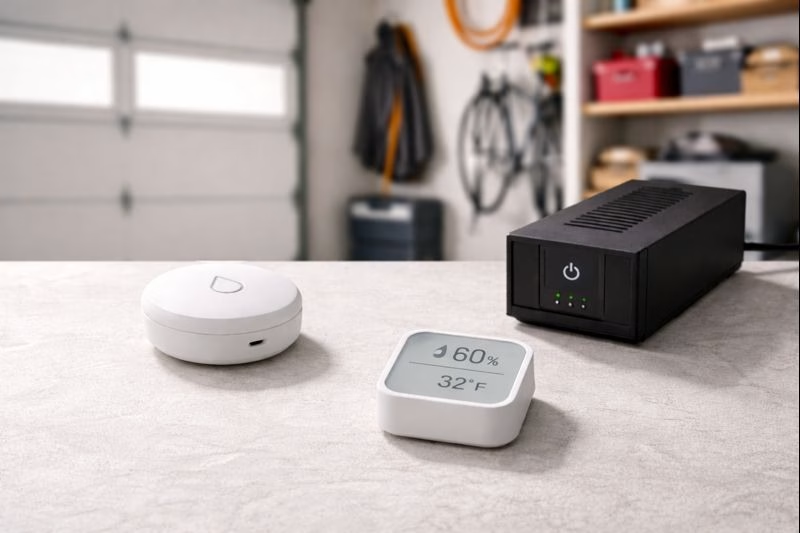
Temperature threshold monitoring
- Near the vulnerable area: low and close to exterior walls if freeze risk matters.
- Avoid direct drafts: don’t place right by the door seam unless your goal is “cold air intrusion” detection.
Water intrusion awareness (selective but valuable)
- Near the garage threshold: if you’ve ever had water push under the door during storms.
- Near interior storage risk zones: where water would damage stored items before you notice.
If you want product options for water detection, our
leak sensor roundup includes picks that work well in tough environments.
Power and connectivity awareness
- Near the router (or garage network gear): if connectivity is a frequent point of failure.
- Near critical garage circuits: freezers, chargers, heaters, or anything that creates risk when power drops.
A simple garage monitoring plan you can copy
Phase 1 (one afternoon)
- Add a garage door status sensor (open/closed) and configure a “left open” alert with a duration that fits your household.
- Add an entry sensor on the garage-to-house door if it’s used frequently or has ever been left ajar.
Phase 2 (same week)
- Add temperature threshold alerts if freezing risk or heat risk is relevant for your climate and storage.
- Address Wi-Fi reliability before expanding to more devices.
Phase 3 (only if you need more confidence)
- Add selective water detection near the threshold if storms have ever pushed water into the garage.
- Add a camera only if you want visual confirmation, not as a substitute for sensors.
- Add power awareness if the garage contains equipment that matters during outages.
If your garage monitoring feels calm and low-noise, you’ll keep it on — and that’s what makes it useful.
Calm, practical takeaway
Garage monitoring is most effective when it’s simple. Start with door status and a “left open” alert. Add the interior access door if it’s a real-world weak point. Use temperature alerts only for meaningful thresholds. Consider power and water awareness only where they change outcomes.
A small number of clean signals will reduce risk without adding noise — and that’s the entire point.
Disclosure: Some links on Plug & Play Living may be affiliate links, which means we may earn a commission if you purchase through them at no additional cost to you. This guide links to internal posts for further reading.