Best Smart Temperature & Humidity Sensors for Homes 2026
Temperature and humidity are two “quiet” signals that explain a lot of problems in a home: why a basement feels musty, why an upstairs room is always uncomfortable, why a nursery feels dry, or why a closet smells off. A good sensor gives you two things: clarity (what’s actually happening) and early warning (alerts before it becomes expensive or annoying).
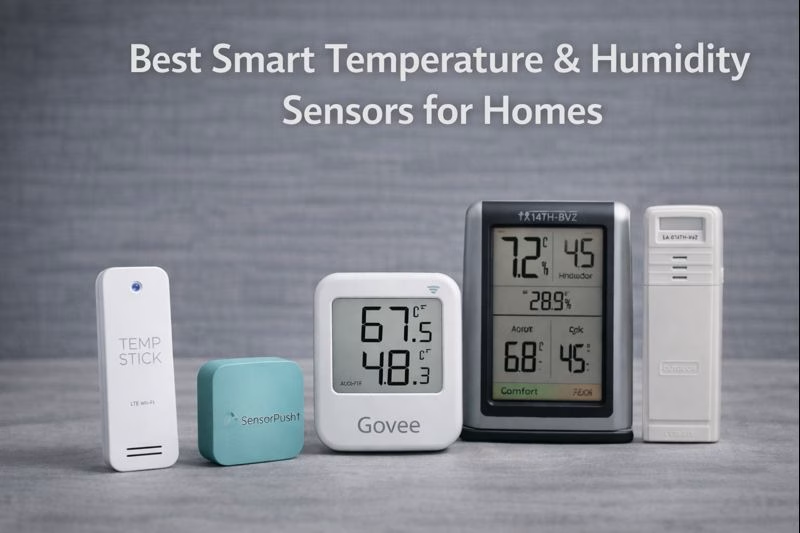
Below are five Amazon-available options that cover different needs: Wi-Fi alerts for remote monitoring, a data-first sensor for trend tracking, and simple display-based monitors that work without fuss.
Related:
Pipe Freeze Prevention Sensors |
Power Outage Devices |
Vacation Homes & Airbnbs
TEMP STICK WI-FI TEMPERATURE & HUMIDITY SENSOR
Best for Remote Monitoring (Second Homes, Basements, “I Want Alerts”)
If you care about getting notified when a room drifts out of range—too cold, too humid, or suddenly warmer than normal—Temp Stick is a strong fit. It’s especially useful for basements, utility rooms, and vacation homes where you’re not physically present to notice small changes. This is the kind of sensor that reduces anxiety: you can check in any time and get a warning before a situation becomes damage.
Setup / real-life frustration: The most common annoyance with any Wi-Fi sensor is placing it in the “right” spot, then realizing that corner has weaker Wi-Fi than you expected. If your basement is a dead zone, you may need to move your router, add a mesh node, or position the sensor a few feet higher/closer to the stairs to keep it consistently connected.
Why We Chose This: It’s built for alerts and remote check-ins—exactly what most homeowners want when they shop for temperature and humidity monitoring.
- Best for: basements, crawl spaces, vacation homes, garages, utility rooms
- What it solves: “Is my house still safe/normal while I’m away?”
- Pro tip: Set alerts above “danger” thresholds (e.g., don’t wait for freezing—set a warning earlier).
SENSORPUSH HT1 TEMPERATURE & HUMIDITY SENSOR
Best for Trend Tracking (Find the Real Problem Room)
Sometimes you don’t need a constant stream of alerts—you need the truth. SensorPush is great when you’re trying to diagnose a home: which room spikes humidity after showers, how cold your mudroom gets overnight, or whether your basement humidity is creeping up week by week. It’s especially useful for finding patterns so you can fix the root issue (insulation gaps, airflow problems, a dehumidifier that’s undersized, etc.).
Setup / real-life frustration: People often expect “smart sensor = Wi-Fi everywhere” out of the box. With SensorPush, the typical path is: start simple with the sensor and your phone nearby, then add a gateway later if you decide you want true remote access. That’s not a flaw—it’s just worth knowing so you’re not surprised on day one.
Why We Chose This: It’s one of the best “data-first” sensors for understanding your home, not just reacting to it.
- Best for: basements, nurseries, wine storage, closets, attics, humidity diagnosis
- What it solves: “What’s happening over time—and why?”
- Pro tip: Use one sensor to identify the worst room first, then expand from there.
GOVEE WI-FI THERMOMETER & HYGROMETER (H5179)
Best Budget Wi-Fi Sensor (Great “First Sensor” Choice)
If you want an affordable sensor that still feels modern and useful, Govee is a smart starting point. It’s ideal for everyday monitoring—like keeping an eye on a nursery, a bedroom that runs dry in winter, or a basement that feels slightly damp. For most people, the value is simple: quick setup, easy app, and the ability to see readings without walking into the room.
Setup / real-life frustration: Many people buy a humidity sensor because “the basement smells musty,” then realize the real issue is that humidity spikes at very specific times (after rain, after showers, or when HVAC cycles). The first week with a Govee-style sensor can be a little frustrating—but in a good way—because it reveals patterns you can actually act on.
Why We Chose This: It’s a strong value pick that covers the basics well and makes humidity/temperature monitoring approachable.
- Best for: nurseries, bedrooms, basements, offices, apartments
- What it solves: “I want a simple sensor with an app and alerts without spending a lot.”
- Pro tip: Use it to validate whether you truly need a dehumidifier—or just better airflow.
ACURITE 00613 INDOOR THERMOMETER & HYGROMETER
Best Simple “Look at It and Know” Monitor (No App Needed)
Not every home needs another app. If you prefer something dead simple, this is the classic approach: a small display you can glance at and immediately understand whether your home is too dry, too humid, or drifting into uncomfortable ranges. It’s surprisingly useful in places like nurseries, bedrooms, and living rooms where comfort is the goal—especially in winter when indoor air can get uncomfortably dry.
Why We Chose This: It’s straightforward, affordable, and ideal for people who want immediate clarity without Wi-Fi, accounts, or settings.
- Best for: nurseries, bedrooms, home offices, living spaces
- What it solves: “Is my indoor air comfortable and healthy right now?”
- Pro tip: Pair with a humidifier in winter if you consistently see low humidity.
LA CROSSE TECHNOLOGY 308-1409WT-CBP (INDOOR/OUTDOOR TEMP + INDOOR HUMIDITY)
Best for Garages, Mudrooms, and “Far Rooms” (Easy Wireless Monitoring)
This is a great choice when your goal is monitoring a tough location—like a garage, mudroom, sunroom, or a room that swings hot/cold because it’s under-insulated. The key advantage is the simple, wireless “remote sensor + display” approach. You don’t have to care about Wi-Fi strength in the garage—you just want a reliable reading inside the house.
Setup / real-life frustration: The most annoying thing about remote sensors is thinking you placed it perfectly, then realizing it’s too close to a drafty door or a heater vent—so the reading doesn’t represent the room. The fix is easy: treat the first placement as a test, then move it a few feet until the data matches what you’re trying to measure.
Why We Chose This: It’s the simplest way to monitor a garage or “edge” space without worrying about Wi-Fi coverage.
- Best for: garages, mudrooms, sunrooms, bonus rooms, workshops
- What it solves: “I want a reliable read from a far room without dealing with connectivity.”
- Pro tip: Place the sensor away from direct sun and exterior door seams for more representative readings.
Quick Placement Guide (Where These Sensors Actually Help)
- Basement: near the dampest corner (not next to the dehumidifier), to see true humidity risk.
- Nursery/bedroom: away from vents so readings reflect comfort.
- Garage/mudroom: interior wall area, away from direct sun and doors.
- Closets/storage: inside the space to catch “stale air” humidity creep.
Disclosure: As an Amazon Associate, we earn from qualifying purchases.