Best Smart Devices for Freezers & Refrigerators (Temperature & Power Alerts)
A freezer failure is one of those problems you usually discover too late. Power goes out while you’re away, a garage outlet trips, or a freezer door doesn’t seal properly—and by the time you notice, everything inside is ruined. The goal with smart freezer and refrigerator monitoring isn’t complexity; it’s early warning.
The devices below focus on the two things that actually matter for food safety: temperature stability and power awareness. These are practical, Amazon-available tools that help you catch issues before they turn into a cleanup.
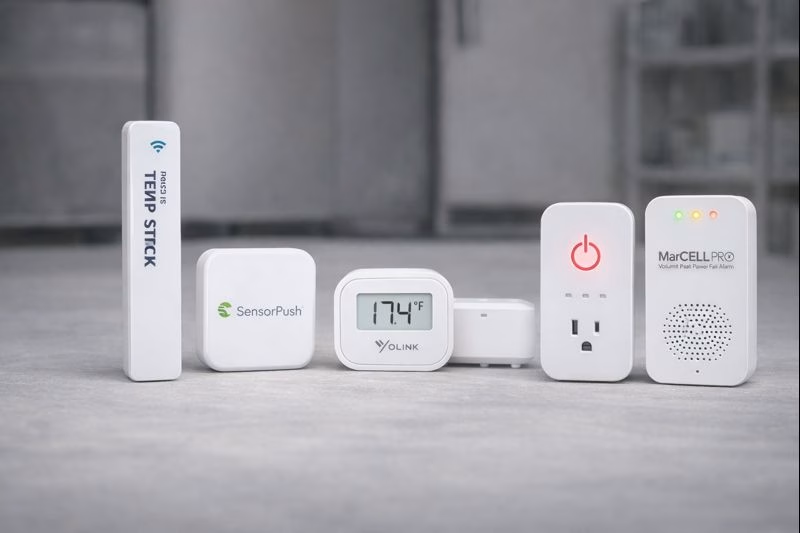
TEMP STICK WI-FI TEMPERATURE SENSOR
Best Overall Freezer Temperature Alert
Temp Stick is one of the most commonly used temperature sensors for freezers because it’s built specifically for alerting, not just data collection. You set your safe temperature range, and if the freezer drifts outside it, you get notified. That makes it ideal for chest freezers in garages, basements, or storage areas you don’t open every day.
What to Know Before Setup: Freezers can be harsh environments for wireless devices. Placement matters—don’t bury the sensor under frozen food. Hanging it from a basket or placing it in an open area improves accuracy and connectivity.
Why We Chose This: It’s reliable, freezer-rated, and focused on alerts rather than overcomplicated dashboards.
- Best for: chest freezers, garage freezers, basement storage
- Good fit if: you want clear alerts when temperatures drift
- Helpful tip: Set alerts slightly above “danger” temps so you have time to react
SENSORPUSH HT1 TEMPERATURE SENSOR
Best for Accuracy & Temperature Trend Tracking
If you want highly accurate temperature readings and the ability to see how your freezer behaves over time, SensorPush is a strong choice. It’s especially useful for spotting subtle issues—like a freezer that warms slightly overnight or struggles during hot afternoons in a garage.
What to Know Before Setup: Out of the box, SensorPush syncs locally to your phone. For full remote alerts when you’re away, you’ll need the optional gateway. Many people start without it and add the gateway once they see how valuable the data is.
Why We Chose This: Its accuracy and historical data make it excellent for diagnosing “almost problems” before they become failures.
- Best for: upright freezers, refrigerators, precision monitoring
- Good fit if: you want to understand temperature patterns, not just alarms
- Helpful tip: Use graphs to confirm whether a freezer is cycling normally
YOLINK TEMPERATURE & HUMIDITY SENSOR
Best Long-Range Sensor for Garages & Outbuildings
Freezers in garages and outbuildings often suffer from weak Wi-Fi, which makes traditional sensors unreliable. YoLink sensors use a long-range communication protocol that’s better suited for these situations. That makes them a strong option when your freezer isn’t close to your router.
What to Know Before Setup: You’ll need a YoLink hub for alerts, but once it’s set up, the range and reliability are excellent—even through walls or across longer distances.
Why We Chose This: It solves one of the biggest freezer-monitoring pain points: distance and connectivity.
- Best for: garage freezers, sheds, basements far from Wi-Fi
- Good fit if: Wi-Fi sensors keep dropping offline
- Helpful tip: Pair with a YoLink power fail alarm for full coverage
YOLINK SMART POWER FAIL ALARM
Best Power-Outage Alert for Freezers
Temperature sensors tell you when a freezer warms up—but a power fail alarm tells you why. If the outlet feeding your freezer loses power, this device sends an alert immediately. That’s critical for catching tripped breakers, unplugged cords, or outages before food spoils.
What to Know Before Setup: Plug it into the same outlet or circuit as the freezer. Alerts are only useful if they reflect the power status you actually care about.
Why We Chose This: It fills the awareness gap that temperature sensors alone can’t cover.
- Best for: garage and basement freezers
- Good fit if: you want immediate notice of power loss
- Helpful tip: Combine with a temp sensor for context and redundancy
MARSELL PRO CELLULAR TEMPERATURE & POWER MONITOR
Best Cellular Backup When Wi-Fi Goes Down
If your freezer is truly mission-critical—or located where internet reliability is questionable—a cellular monitor adds another layer of protection. MarCELL Pro uses cellular service to send alerts even when your Wi-Fi and router are down, which can happen during extended outages.
What to Know Before Setup: This device requires a cellular subscription, which adds ongoing cost. It’s best reserved for high-value freezers or properties where losing power without knowing would be especially costly.
Why We Chose This: It’s one of the few consumer options that stays online when everything else goes dark.
- Best for: vacation homes, remote freezers, critical food storage
- Good fit if: Wi-Fi outages are common or unacceptable
- Helpful tip: Place it near the freezer but away from cold airflow
Freezer Monitoring Setup Checklist
- Temperature sensor: inside the freezer, not buried under food
- Power fail alarm: same outlet or circuit as the freezer
- Connectivity: confirm alerts reach you before trusting the setup
- Redundancy: power + temperature alerts together work best
Disclosure: As an Amazon Associate, we earn from qualifying purchases.