Best Smart Devices for Power Outages (Alerts, Backup & Monitoring) – 2026
Power outages are annoying when they’re short—and expensive when they’re not. The best “smart” outage setup isn’t complicated: you want (1) backup power for essentials, (2) an alert when power drops (especially if you’re away), and (3) visibility into what’s still running and what needs attention when the lights come back on.
This guide focuses on practical, Amazon-available devices that actually help in real life: UPS battery backups for routers and computers, portable power for longer outages, and power-loss alerts so you’re not guessing what happened.
Related:
No-Subscription Smart Home Devices |
Basement Monitoring Systems |
Power Monitoring Plugs |
Basement & Crawl Space Sensors
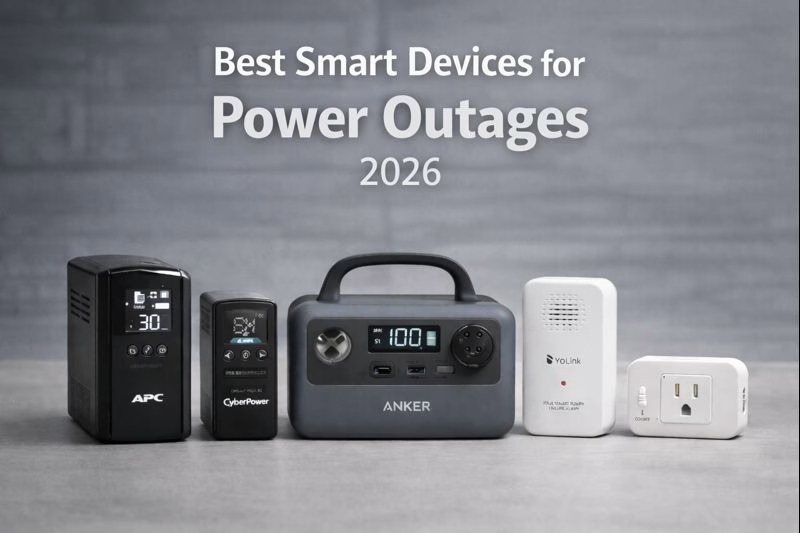
APC BACK-UPS BE600M1 (UPS)
Best Simple UPS for Router + Modem (Most Homes)
This is the classic “keep the internet alive” move. If your Wi-Fi drops the second the power flickers, a small UPS like this can keep your router/modem running long enough to ride out short outages and prevent constant reboots. It’s also great for protecting devices from surges when power returns.
- Who it’s for: Anyone who wants Wi-Fi stability during brief outages and surge protection year-round.
- Why it’s worth it: Huge quality-of-life improvement for a small, set-it-and-forget-it purchase.
- Real-world tip: Prioritize router + modem first—then add a second UPS later if needed.
CYBERPOWER CP850PFCLCD (UPS)
Best UPS for Home Offices + Sensitive Electronics
If you work from home or care about protecting a desktop, NAS, or higher-end electronics, this is a strong upgrade pick. The LCD and monitoring features make it easier to understand load and runtime, and it’s a more “serious” backup choice for people who want fewer surprises.
- Who it’s for: Home office users, desktop setups, or anyone who wants better monitoring and control.
- Why it’s worth it: Helps prevent data loss and gives you a clean shutdown window during outages.
- Real-world tip: Plug only essentials into battery-backed outlets—avoid printers/heaters (they crush runtime).
ANKER 521 POWERHOUSE (PORTABLE POWER STATION)
Best Portable Backup for Longer Outages
A portable power station is what you want when an outage isn’t just a flicker. It’s your “keep the basics running” tool: charging phones, powering a small fan, keeping a laptop alive, and extending internet uptime when paired with a router UPS strategy.
- Who it’s for: Anyone who wants flexible backup power without a generator.
- Why it’s worth it: Portable, quiet, and useful beyond outages (travel, outdoor projects, emergency kits).
- Real-world tip: Treat it like a battery: keep it topped up and test it once a month so it’s ready when needed.
YOLINK SMART POWER FAIL ALARM (HUB REQUIRED)
Best “Tell Me When the Power Goes Out” Alert (Especially When You’re Away)
This is the sleeper MVP for second homes, basements, or anyone who travels: you can get notified when power drops (and often when it returns). That’s incredibly useful if you care about a freezer, sump pump, dehumidifier, or anything that quietly matters when you’re not physically there.
- Who it’s for: Vacation homes, people who travel often, and anyone monitoring freezers/sump pumps.
- Why it’s worth it: Awareness is everything—knowing the outage happened can be the difference between “fine” and “damage.”
- Real-world tip: Pair with a temperature sensor near a freezer for the most useful one-two punch.
TP-LINK KASA SMART PLUG KP125
Best “Remote Reset + Status Check” Tool After an Outage
After a power outage, a surprising number of devices come back in a weird state—especially routers, modems, extenders, and certain smart hubs. A smart plug gives you a clean remote reboot option, plus an easy way to check whether something is actually powered. It’s a simple tool that saves a lot of annoyance.
- Who it’s for: Anyone who wants the ability to reboot gear remotely after an outage.
- Why it’s worth it: Cheap “control lever” that solves a common post-outage headache.
- Real-world tip: Use it for your modem/router (if safe for your setup) and any “problem child” device that needs a restart to behave.
Quick Setup Checklist (A Simple Outage-Ready Stack)
- Step 1: Put your router + modem on a UPS (start with the APC).
- Step 2: Add a power outage alert if you travel or monitor a freezer/sump pump.
- Step 3: Keep a portable power station charged for longer outages.
- Step 4: Use a smart plug to reboot finicky devices remotely after power returns.
Disclosure: As an Amazon Associate, we earn from qualifying purchases.